
Blog
Floating TV Stand Buying Guide: Style & Storage Tips
Buying Guide
Your Essential Floating TV Stand Buying Guide
A floating tv stand can transform your living room by adding modern style and freeing up floor space. This guide will help you choose the right one for your needs.
Why Choose a Floating TV Stand?
A floating tv stand mounts directly to the wall, creating a clean, streamlined look that makes any room feel larger. By eliminating legs and lifting the unit off the floor, it also simplifies cleaning and reduces visual clutter.
Beyond aesthetics, wall-mounted consoles offer practical benefits. They keep electronics at a comfortable viewing height and can include storage for media components, games, and accessories. For homes with small children or pets, a floating design eliminates the risk of tipping and keeps cords out of reach.
Key Factors to Consider
Size and Weight Capacity
Measure your TV’s width and ensure the stand is at least as wide for stability. Check the weight rating—most units support 50–100 lbs, but heavy TVs require a sturdier mount. Also measure the wall space to avoid overcrowding.
Material and Finish
Common materials include engineered wood, solid wood, and metal. Engineered wood (like MDF or particleboard) is affordable and durable, while solid wood offers premium longevity. Finishes range from matte black to natural oak—choose one that complements your decor.
Storage Configuration
Assess your needs: open shelves for display, closed cabinets to hide clutter, or a mix. Cubbies are great for media players, books, or decorative items. Some stands include adjustable shelves for flexibility.
Installation Requirements
Most floating tv stands require mounting to wall studs using included hardware. Ensure you have a stud finder, level, and drill. If you’re not comfortable with DIY, hire a professional. Always follow the manufacturer’s instructions to avoid accidents.
Cable Management: Keep It Tidy
A clutter-free setup is key to the floating look. Look for stands with built-in cable channels, grommets, or open backs that allow wires to pass through. Use zip ties or adhesive clips to bundle cables behind the unit. For a truly invisible solution, consider in-wall cable routing (check local codes).
Effective cable management not only improves aesthetics but also reduces dust buildup and makes it easier to swap devices.
Design and Style Tips
Match the stand’s style to your room. A black floating tv stand suits modern and industrial spaces, while white or wood tones work in Scandinavian or rustic interiors. Consider the stand’s depth—shallower units blend better with the wall, while deeper ones offer more storage.
Add personality with decor: place a plant, framed photos, or a soundbar on the stand. Keep the surface uncluttered to maintain the airy feel. Lighting, such as LED strips behind the TV, can enhance the floating effect.
For more on design principles, see Wikipedia’s interior design page.
Installation Best Practices
Before mounting, locate studs with a stud finder and mark their positions. Use a level to ensure the bracket is straight. If your stand uses a French cleat system, align the cleat carefully. For heavy units, have a helper lift and secure it.
Double-check that all screws are tight and the stand is firmly attached. Test by gently pulling downward. Avoid overloading shelves beyond the weight limit.
Budget and Value
Prices range from $100 to $500+. Entry-level models offer basic functionality, while mid-range units provide better materials and cable management. High-end stands feature solid wood and customizable configurations. Determine your budget and prioritize features that matter most: size, storage, and ease of installation.
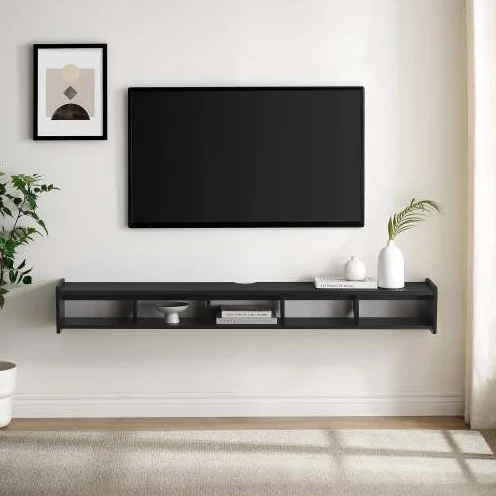
Goldoma 65″ Floating TV Stand with 5 Cubbies – Black Wall Mounted Media Console
For a reliable option, consider the Goldoma 65″ Floating TV Stand with 5 Cubbies – Black Wall Mounted Media Console, which combines ample storage with a sleek design.
Frequently asked questions
Can I install a floating tv stand on drywall alone?
No, you must mount into wall studs for safety. Drywall anchors are not sufficient for the weight of a TV and stand.
How do I hide cables with a floating tv stand?
Look for stands with built-in cable management channels or grommets. You can also use cord covers that paint to match the wall.
What is the ideal height for a floating tv stand?
The center of the TV should be at eye level when seated, typically 42-48 inches from the floor. Adjust the stand height accordingly.
Can I mount a floating tv stand on a brick or concrete wall?
Yes, but you’ll need masonry anchors and a hammer drill. Consult a professional if you’re unsure about the installation.