
Blog
The Ultimate L Shaped Computer Desk Buying Guide
Buying Guide
Find Your Perfect L Shaped Computer Desk
An L shaped computer desk can transform your workspace, offering ample surface area and a defined corner for productivity. But with so many options, how do you pick the right one?
Why Choose an L Shaped Computer Desk?
An L shaped computer desk is more than just a piece of furniture; it’s a strategic investment in your daily workflow. By utilizing the corner of a room, it maximizes your available floor space, often providing more usable surface area than a standard rectangular desk. This layout naturally creates distinct zones for different tasks—say, a primary monitor setup on one side and space for writing or crafting on the other.
For those who work from home or enjoy gaming, the extra real estate is invaluable. You can spread out documents, keep a second monitor within easy reach, or have a dedicated spot for your coffee mug that isn’t in the way of your mouse. Moreover, the L-shape can psychologically help you separate work from leisure if you use one side for professional tasks and the other for creative hobbies.
Beyond functionality, these desks add a modern, professional aesthetic to any room. They come in a variety of materials, from solid wood to sleek metal and glass, allowing you to match your existing decor. Whether you’re outfitting a home office, a gaming room, or a living area, an L-shaped desk can be the centerpiece that ties the space together.
Key Factors to Consider Before Buying
Before you start shopping, it’s essential to evaluate your needs and your room. Here are several factors that will guide your decision:
- Space and Dimensions: Measure your room carefully. An L shaped computer desk typically requires a corner with at least 60 inches on each side. Don’t forget to account for clearance for your chair and any drawers or shelves you plan to add.
- Material and Durability: Desks are commonly made from particle board, MDF, solid wood, or metal. Solid wood is the most durable and attractive but can be heavy and expensive. MDF and particle board are more budget-friendly but may be less sturdy. Metal frames offer a modern look and are often very stable.
- Ergonomics: Your desk height should allow your elbows to rest at a 90-degree angle when typing. Most desks are around 29-30 inches high, but if you’re taller or shorter, consider an adjustable model or one with a monitor stand to raise your screen to eye level.
- Storage Options: Do you need drawers, shelves, or a hutch? Think about what you’ll be storing—pens, paper, or gaming accessories—and choose a desk with appropriate storage to keep your workspace clutter-free.
- Style and Aesthetics: The desk should complement your room’s decor. From minimalist white to rustic wood or industrial black, there’s a style for every taste. Consider the color and finish that will blend seamlessly with your existing furniture.
- Assembly and Maintenance: Some desks require extensive assembly. Check reviews for ease of setup, and consider whether you’ll need help. Also, think about cleaning—glass tops show smudges, while wood may require special care.
Understanding Desk Measurements
When looking at desk dimensions, pay attention to the total width and depth of each side. A standard L-shaped desk might have a 60-inch main section and a 48-inch return. Ensure that the shorter side doesn’t block a doorway or window. Also, consider the height of the desk in relation to your chair—if you use a drafting chair, you may need a higher desk.
Material and Build Quality: What to Look For
The material of your L shaped computer desk affects not only its appearance but also its longevity. Here’s a breakdown of common materials:
- Solid Wood: Timeless and sturdy, solid wood desks can last a lifetime. They are heavy and often more expensive, but they add warmth to any room. Look for hardwoods like oak, maple, or walnut for the best durability.
- Engineered Wood (MDF/Particleboard): These are cost-effective and come in many finishes. MDF is denser and more moisture-resistant than particleboard, making it a better choice for a desk. However, they can be prone to chipping or warping if not cared for properly.
- Metal: Steel or aluminum frames offer a modern, industrial look. They are incredibly sturdy and often lighter than wood, making them easier to move. Metal desks may have a glass or wood top, combining aesthetics with functionality.
- Glass: Tempered glass tops are sleek and easy to clean, but they can show fingerprints and may feel cold. They are also heavier than they appear and require careful handling during assembly.
When examining build quality, check the thickness of the desktop (at least 1 inch for stability), the quality of the joints, and whether the frame is reinforced. A desk that wobbles is not only annoying but can also damage your equipment.
Ergonomics and Comfort: Your Body Will Thank You
Spending hours at your desk can take a toll on your body if your setup isn’t ergonomic. An L shaped computer desk can actually promote better ergonomics by allowing you to position your monitor at the optimal distance and height. Here are some tips:
- Monitor Placement: The top of your monitor should be at or slightly below eye level. Use a monitor stand or an adjustable arm to achieve this. With an L-shaped desk, you can place your monitor in the corner to create a more immersive experience.
- Keyboard and Mouse: Your keyboard should be at elbow height, and your mouse should be within easy reach without stretching. A desk with a keyboard tray can help, but many modern desks have a comfortable height for typing directly on the surface.
- Chair Compatibility: Ensure your chair can roll under the desk and that you have enough legroom. The L-shape often provides ample space for your legs, but check the depth of the return side.
- Take Breaks: Even with a perfect desk, remember to stand up and stretch every hour. Consider a standing desk converter if you want to alternate between sitting and standing.
Investing in an ergonomic setup is an investment in your health. A well-designed L-shaped desk can help you maintain good posture and reduce the risk of back and neck pain.
Space Planning and Layout Ideas
Integrating an L shaped computer desk into your room requires thoughtful planning. Here are some layout ideas to make the most of your space:
- Corner Placement: This is the classic setup, placing the desk in the corner to utilize otherwise dead space. It works well in small rooms and creates a cozy, focused environment.
- Room Divider: In a large room, an L-shaped desk can act as a subtle divider, separating a home office from a living area. Position it so the back faces the rest of the room, creating a distinct workspace.
- Against a Wall: If you have a long wall, you can place one side of the L against the wall and the other perpendicular, creating an open workspace that faces the room. This is great for monitoring kids or watching TV while working.
- Multi-Purpose Use: Use one side for your computer and the other for a crafting or reading nook. Add a comfortable chair on the return side to create a versatile area.
Remember to leave at least 30 inches of walking space around the desk to avoid feeling cramped. Also, consider cable management—look for desks with built-in grommets or cable trays to keep cords organized.
Additional Features to Enhance Your Experience
Modern L shaped computer desks come with a variety of features that can elevate your workspace. Consider these add-ons when making your choice:
- Power Outlets and USB Ports: Built-in power strips are incredibly convenient, allowing you to plug in your devices without reaching for a wall outlet. Look for desks with multiple outlets and USB ports to keep your gear charged.
- LED Lighting: Some desks feature LED strips that add ambiance and improve visibility. These can be especially appealing for gaming setups, with customizable colors to match your mood.
- Monitor Stands and Risers: A built-in monitor stand can help raise your screen to eye level, improving ergonomics and freeing up desk space for other items.
- Drawers and Hutches: Storage is always a plus. Drawers keep office supplies out of sight, while a hutch provides additional shelving for books or decor. If you have a lot of gear, a hutch can be a game-changer.
- Cable Management: Look for desks with built-in cable trays or grommets to keep your cords organized and out of the way. This not only looks cleaner but also prevents tangling.
While these features are nice, prioritize the basics first—stability, size, and comfort. You can always add accessories like a separate monitor arm or cable clips later.
Maintenance and Care Tips
To ensure your L shaped computer desk lasts for years, follow these care guidelines:
- Dust Regularly: Use a soft, dry cloth to dust the surface weekly. Avoid abrasive cleaners that can scratch the finish.
- Clean Spills Immediately: Wipe up any liquid spills right away to prevent stains or warping, especially on wood or MDF desks.
- Use Coasters and Mats: Place coasters under drinks and a mouse pad under your mouse to prevent scratches and heat marks.
- Tighten Hardware: Periodically check screws and bolts and tighten them as needed to maintain stability.
- Avoid Direct Sunlight: Prolonged exposure to sunlight can fade the finish. Position your desk away from windows or use curtains.
With proper care, your desk will remain a functional and beautiful part of your home for many years. Remember, a little maintenance goes a long way.
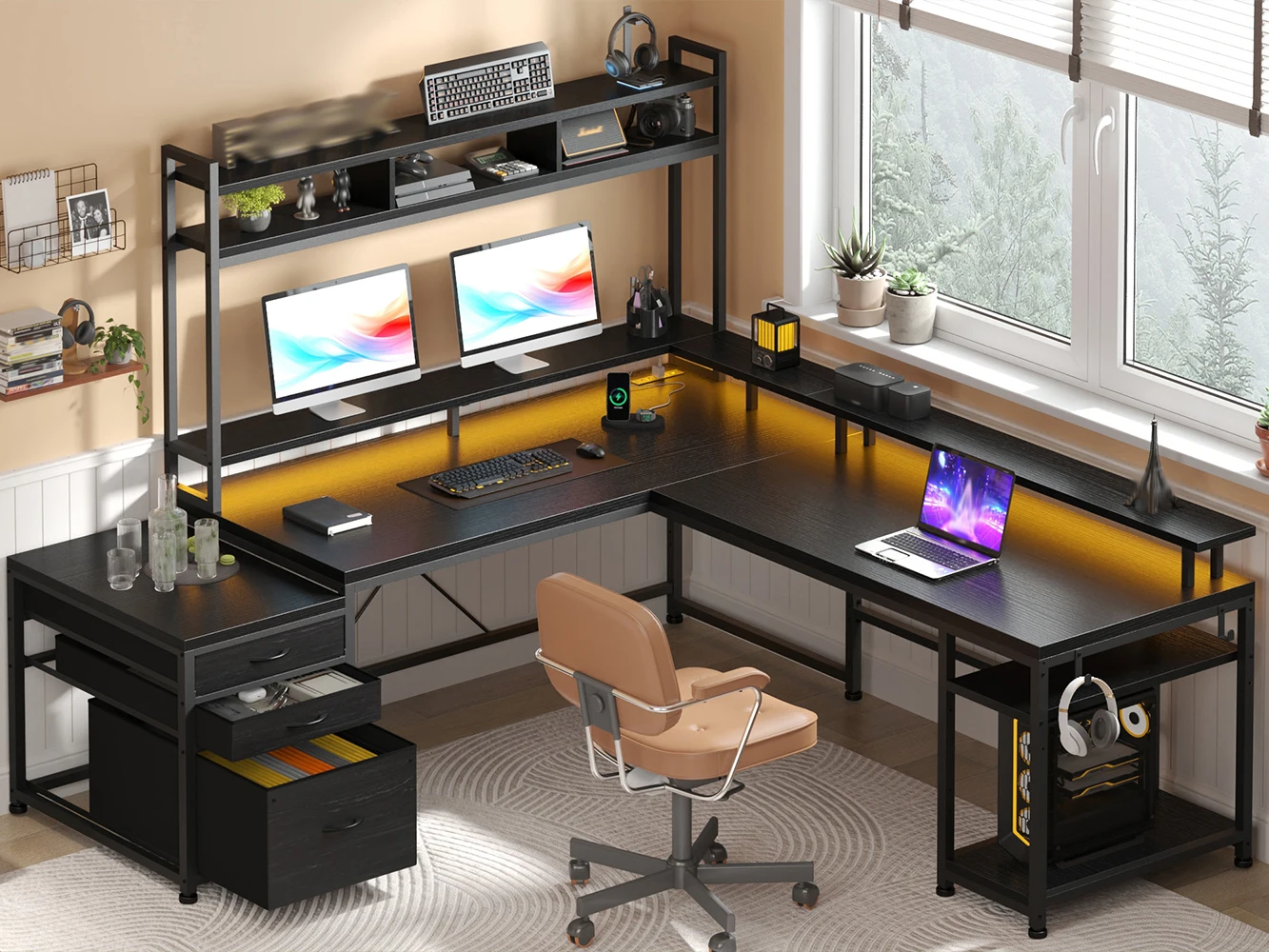
EnHomee L Shaped Computer Desk with Power Outlet & Monitor Stand & LED Gaming Desk with Hutch Drawers for Living, Gaming Room
If you’re looking for a feature-packed option, the EnHomee L Shaped Computer Desk with Power Outlet & Monitor Stand & LED Gaming Desk with Hutch Drawers offers convenience and style in one package.
Frequently asked questions
What is the ideal size for an L shaped computer desk?
The ideal size depends on your room and needs. A standard L-shaped desk has a main section of 60-72 inches and a return of 48-60 inches. Measure your space and ensure you have at least 30 inches of clearance for mobility.
Are L shaped desks good for gaming?
Absolutely! L-shaped desks provide ample surface area for multiple monitors, gaming accessories, and even a dedicated space for a console. Many gaming desks come with features like LED lighting and cable management, making them ideal for immersive setups.
How do I assemble an L shaped desk?
Assembly varies by model. Most come with detailed instructions and all necessary tools. It’s recommended to have a second person help with flipping and aligning parts. Allow 1-2 hours for assembly, depending on complexity.
Can I use an L shaped desk in a small room?
Yes, if you choose a compact model. Look for desks with smaller footprints, such as 47-inch sides, and consider options without a hutch to save vertical space. The corner design actually helps maximize small areas.
