
Blog
The Best Computer Desk with Drawers for Every Workspace
Buying Guide
Computer Desk with Drawers: A Complete Buying Guide
A computer desk with drawers is more than a workspace—it’s the backbone of your daily productivity. We’ve spent hours researching to help you find the right one for your needs.
Why Choose a Computer Desk with Drawers?
A computer desk with drawers offers the perfect blend of functionality and organization. Unlike a bare desk, drawers provide a dedicated place for your essentials—pens, notebooks, chargers, and paperwork—keeping your surface clutter-free. This not only improves focus but also creates a more inviting workspace. Whether you’re a student, a remote professional, or a creative, having storage within arm’s reach can streamline your workflow and reduce stress.
Moreover, a desk with drawer space encourages a habit of tidiness. When everything has a home, you’re less likely to let clutter pile up. Plus, the added weight of drawers often makes the desk more stable, which is a bonus if you have a heavy monitor or multiple devices. So, if you value a neat and efficient workspace, this style of desk is a smart investment.
Key Features to Consider
When shopping for a computer desk with drawers, several features can make or break your experience. Here’s what to look for:
- Drawer Dimensions and Layout: Check the depth and width. Can they hold your laptop, files, or office supplies? Look for a mix of shallow and deep drawers for versatility.
- Material Quality: Solid wood, MDF, or metal? Each has its pros and cons. Wood is durable and classic, MDF is budget-friendly, and metal is sleek and sturdy.
- Weight Capacity: Ensure the desk can support your monitor, keyboard, and other equipment. A sturdy frame is essential.
- Cable Management: Built-in grommets or trays can keep cords tidy and out of sight.
- Assembly Complexity: Some desks require more effort. Read reviews to gauge ease of setup.
- Adjustability: Height-adjustable options are great for ergonomics, but they may cost more.
Material Matters: Wood, Metal, and More
The material of your computer desk with drawers affects durability, maintenance, and aesthetic. Here’s a breakdown:
Solid Wood
Solid wood desks are timeless and sturdy. They can handle heavy use and often age beautifully. However, they are heavier and may require more care to avoid scratches and water rings. If you prefer a natural, warm look, this is a top choice.
MDF (Medium-Density Fiberboard)
MDF is a cost-effective alternative that offers a smooth finish. It’s dense and resistant to warping, but it can be susceptible to moisture damage if not sealed properly. For a budget-friendly option that doesn’t compromise on style, MDF is worth considering.
Metal
Metal desks exude a modern, industrial vibe. They are often lightweight yet sturdy, and they’re easy to clean. However, they can be prone to scratches and may feel cold to the touch. If you want a minimalist look, metal is a great fit.
Laminate
Laminate desks feature a printed surface over a composite core. They offer a wide range of designs, including wood grain finishes, at an affordable price. They are easy to clean and resist stains, but they can chip or peel over time.
Size and Space Planning
Before you buy, measure your room and your intended workspace. A computer desk with drawers should fit comfortably without crowding the room. Consider the following:
- Desk Depth: Ensure it’s deep enough for your monitor and keyboard while leaving room for writing or other tasks. Standard depths range from 20 to 30 inches.
- Desk Width: Think about how many monitors or items you’ll place. A wider desk offers more surface area but may dominate a small room.
- Clearance for Drawers: Make sure the drawers can open fully without hitting a wall or other furniture.
- Legroom: The desk should have enough space underneath for your legs and a chair, ideally with a height of at least 28 inches.
If you’re tight on space, consider a corner desk with drawers to maximize the usable area. Always visualize how the desk will fit into your daily routine.
Ergonomics and Comfort
Your health matters as much as storage. A well-designed computer desk with drawers should support good posture and reduce strain. Here are ergonomic tips:
- Monitor Height: The top of your screen should be at eye level. Adjustable monitor stands or a desk with a raised shelf can help.
- Keyboard Placement: Your elbows should be at a 90-degree angle, and your wrists should be straight. A keyboard tray can help achieve this.
- Chair Compatibility: Ensure the desk height works with an ergonomic chair. The standard desk height is around 29 inches, but you may need a taller or shorter option.
- Drawer Accessibility: Frequently used items should be in the top drawers, so you don’t have to bend or stretch excessively.
Remember, even the best desk can’t fix a poor chair. Invest in a supportive chair and take regular breaks to stretch.
Style and Aesthetics
A computer desk with drawers is a significant piece of furniture, so it should complement your room’s décor. Here are some popular styles:
Modern Minimalist
Clean lines, neutral colors, and sleek surfaces define this style. It works well in contemporary spaces and can make a small room feel larger.
Rustic Farmhouse
Wood grains, distressed finishes, and sturdy construction give a cozy, warm feel. Pair with metal accents for a charming look.
Industrial
Combining metal frames with wood or metal surfaces, this style adds an edgy, urban touch. It’s durable and often quite functional.
Traditional
Classic details like carved legs, rich finishes, and elegant hardware create a timeless look that suits formal settings.
Choose a style that resonates with you, but also consider how it will age. A versatile design can adapt to future changes in your décor.
Budget and Value
Computer desks with drawers range from budget-friendly to high-end. Set a realistic budget, but remember that a desk is a long-term investment. Spending a bit more on a durable model can save you money in the long run. Look for sales or discounts, and always read reviews to ensure you’re getting good value.
When evaluating cost, consider the quality of materials, construction, and warranty. A well-made desk can last decades, so it’s worth paying for reliability. If you’re on a tight budget, consider buying used or refurbished, but inspect for damage.
Final Tips and Recommendations
Before making a purchase, take these final steps:
- Read Reviews: See what real users say about durability, assembly, and functionality.
- Check Return Policy: Ensure you can return the desk if it doesn’t meet your expectations.
- Consider Future Needs: Will your storage requirements grow? A desk with expandable features might be wise.
- Think About Aesthetics: Does the desk blend with your existing furniture?
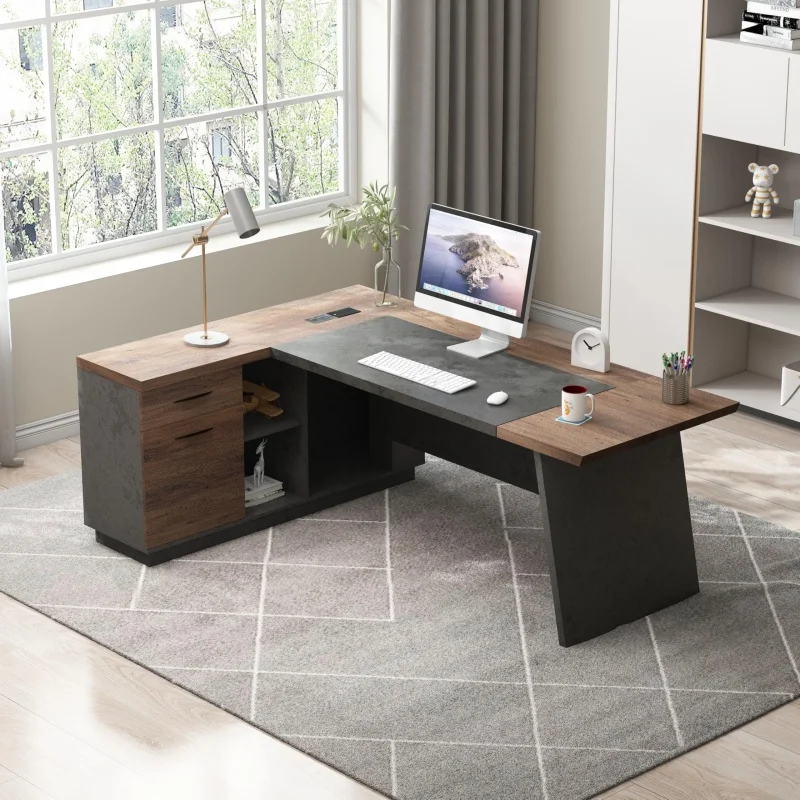
For a reliable option, the ergonomics of a computer desk with drawers are crucial. One excellent choice is the USA Warehouse Modern Computer Desk Set with Drawers Storage Shelves Business Workstation for Home Office, which offers ample storage and a sleek design. But whatever you choose, prioritize your comfort and organization.
USA Warehouse Modern Computer Desk Set with Drawers Storage Shelves Business Workstation for Home Office
For a reliable and stylish option, consider the USA Warehouse Modern Computer Desk Set with Drawers Storage Shelves Business Workstation for Home Office, which combines functionality and durability.
Frequently asked questions
What is the standard height for a computer desk with drawers?
The standard height is around 29 inches, which suits most adults. However, for ergonomic comfort, ensure your elbows are at a 90-degree angle when typing. If you’re taller or shorter, consider an adjustable desk or use a footrest.
How many drawers should I look for in a computer desk?
It depends on your storage needs. For basic organization, 2-3 drawers are usually sufficient. If you have many small items or files, opt for a desk with 4 or more drawers, including a mix of shallow and deep ones.
Can I use a computer desk with drawers for gaming?
Yes, many gamers prefer desks with drawers to store controllers, games, and accessories. Look for a sturdy desk with cable management and enough surface area for multiple monitors. Ensure the drawers can hold heavier items if needed.
How do I assemble a computer desk with drawers?
Most desks come with instructions and necessary tools. Start by sorting parts, then follow the step-by-step guide. It’s wise to have a second person help with lifting heavy pieces. If you’re not handy, consider hiring a professional or choosing a desk with easy assembly features like pre-drilled holes.
