
Blog
Light Oak Computer Desk: A Complete Buying Guide
Buying Guide
How to Choose a Light Oak Computer Desk
A light oak computer desk can transform your workspace, but with so many options, how do you pick the right one? This guide walks you through the key considerations.
Why Choose a Light Oak Computer Desk?
Light oak has a timeless appeal that brightens any room. Its natural grain adds warmth without overpowering your decor. Unlike darker woods, light oak reflects light, making small spaces feel larger and more inviting. It pairs beautifully with both modern and traditional interiors, and it’s versatile enough to grow with your style.
Beyond aesthetics, light oak is durable and easy to maintain. A simple wipe with a damp cloth keeps it looking fresh. Plus, its neutral tone allows you to experiment with accent colors and accessories.
Materials: Solid Wood vs. Veneer
When shopping for a light oak computer desk, you’ll encounter two main types: solid wood and veneer. Solid oak is heavy, sturdy, and can be refinished multiple times, but it’s more expensive. Veneer, on the other hand, uses a thin layer of real oak over engineered wood, offering a similar look at a lower cost.
For most home offices, veneer provides excellent value. It’s less prone to warping and is lighter to move. However, if you plan to keep your desk for decades, solid oak is worth the investment. Check the product specs to see what you’re getting.
Size and Workspace Considerations
Measure your room before you buy. A light oak computer desk should fit comfortably without crowding the space. Consider the depth as well: you need enough room for your monitor, keyboard, and other essentials. A depth of 24 inches is standard, but if you have a large monitor, look for at least 30 inches.
Also think about the height. Most desks are around 29 inches, which suits average-height users. If you’re taller or shorter, look for an adjustable option or add a keyboard tray. Remember, your chair should be adjustable too, so you can maintain a 90-degree angle at your elbows.
Storage and Cable Management
Think about what you’ll store. Do you need drawers for files, or are open shelves enough? Some desks come with built-in cable management, which keeps cords tidy and out of sight. This is a blessing in a home office where multiple devices are the norm.
If you prefer a minimalist look, consider a desk with a modesty panel that hides cables. Or, you can add cable trays yourself. Either way, a clutter-free desk boosts focus and reduces stress.
Style and Design Options
Light oak desks come in various styles: from sleek and modern to rustic and traditional. Look for features that complement your existing furniture. For instance, a desk with tapered legs feels mid-century, while one with metal accents leans industrial.
Don’t forget about the finish. Some light oak desks have a matte finish, others a satin sheen. The right finish can enhance the wood’s natural beauty and protect it from scratches. Also, check if the desk has rounded edges for comfort and safety.
Ergonomics and Health
Your desk should support your body, not the other way around. The ideal setup is when your eyes align with the top of your monitor, your feet flat on the floor, and your wrists straight while typing. This reduces strain on your neck, back, and wrists.
If you spend long hours at your desk, consider a height-adjustable model. While more expensive, they allow you to alternate between sitting and standing, which has proven health benefits. Look for a desk that’s stable at all heights to avoid wobbling.
Budget and Value
Light oak computer desks range from budget-friendly to high-end. Set a budget before you start, but remember that a desk is a long-term investment. A well-made desk can last decades, so it’s worth spending a little more for quality.
Read reviews to gauge durability and customer satisfaction. Also, consider the warranty. A good warranty indicates the manufacturer’s confidence in their product. Compare features across brands to find the best value for your money.
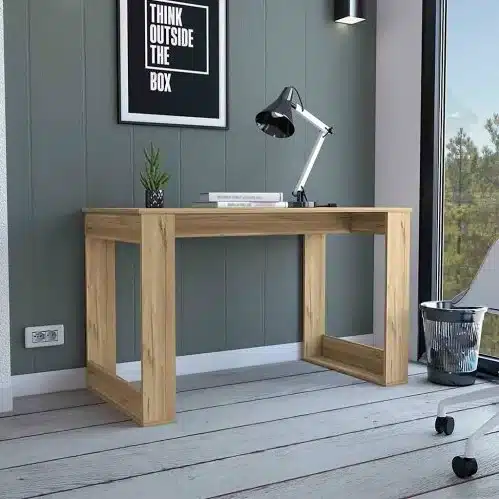
Albion Light Oak Finish Computer Desk FCJ’s Ample Worksurface Desk with Stylish Legs
If you’re looking for a light oak computer desk that balances style and function, consider the Albion Light Oak Finish Computer Desk FCJ’s Ample Worksurface Desk with Stylish Legs.
Frequently asked questions
What is the standard height for a computer desk?
The standard height is around 29 inches, but it’s best to choose based on your own height and chair. Your elbows should be at a 90-degree angle when typing.
How do I clean a light oak desk?
Use a soft, damp cloth to wipe the surface. Avoid harsh chemicals or abrasive cleaners. For stubborn spots, a mild soap solution works well. Dry immediately to prevent water marks.
Can I use a light oak desk for a standing desk?
Some light oak desks are height-adjustable, allowing you to switch between sitting and standing. Check the product specs for adjustable height ranges.
Is solid oak worth the extra cost?
Solid oak is more durable and can be refinished, making it a good long-term investment. If you plan to keep the desk for many years, it may be worth the higher price.
