
Blog
Gaming Desk with Keyboard Tray: The Complete Guide
Buying Guide
The Ultimate Gaming Desk with Keyboard Tray Guide
A gaming desk with keyboard tray can transform your setup, offering both comfort and organization. In this guide, we’ll walk you through everything you need to consider before making a purchase.
Why Choose a Gaming Desk with Keyboard Tray
When you spend hours at a time gaming or working, comfort becomes non-negotiable. A gaming desk with keyboard tray brings the keyboard and mouse closer to your body, reducing strain on your shoulders and wrists. This setup encourages a more natural posture, which can make a noticeable difference during long sessions.
Beyond ergonomics, a keyboard tray helps keep your main desk surface clear for other essentials like a monitor, speakers, or a snack. That extra space can be a game-changer, especially if you’re working with a smaller room. Plus, many trays tuck away neatly when not in use, maintaining a clean aesthetic.
However, not all keyboard trays are created equal. Some are fixed, while others are height-adjustable or even have built-in mouse pads. Think about how you like to position your arms when playing—do you prefer a high or low keyboard? Adjustability can be a huge plus, so keep an eye out for that feature.
Key Features to Look For
When shopping for a gaming desk with keyboard tray, there are several features that can make or break your experience. Here are the most important ones to consider:
- Adjustable keyboard tray: Being able to tweak the height and tilt of the tray ensures that your arms stay at a comfortable angle, reducing fatigue.
- Cable management: A desk with built-in cable trays or grommets keeps your setup tidy and prevents tangles, which is especially useful if you have multiple devices.
- Sturdy construction: Look for a desk made from solid materials like steel or high-density MDF. A wobbly desk can be distracting and even damaging to your equipment.
- Size and weight capacity: Make sure the desk can accommodate your monitor(s), PC, and other peripherals. A weight capacity of at least 150 pounds is a good benchmark for most setups.
- Surface material: A smooth, easy-to-clean surface is ideal. Some materials are more resistant to scratches and spills, which is a plus if you often have drinks nearby.
Don’t forget to check the depth of the desk. A deeper surface gives you more room for a large monitor or multiple screens, but it may also push the keyboard tray further away. Balance is key.
Ergonomics: Protecting Your Body
Ergonomics isn’t just a buzzword—it’s about designing your workspace to fit your body, not the other way around. A gaming desk with keyboard tray can be a huge step in the right direction, but only if you set it up correctly.
According to the Occupational Safety and Health Administration, the ideal typing position is with your elbows at a 90-degree angle and your wrists straight. A keyboard tray that sits slightly below desk level helps achieve this. Also, make sure the tray is deep enough to hold your keyboard and mouse comfortably without crowding.
Another consideration is the mouse surface. Some trays have a built-in mouse pad, which can be convenient, but if you’re a gamer who needs a large mousepad for low sensitivity settings, you might prefer a tray that leaves room for your own pad.
Remember, a good keyboard tray should also allow you to pull it out far enough to reach your keyboard without stretching. If the tray is too short, you’ll end up hunching forward, defeating the purpose of having it.
Materials and Build Quality
The material of your gaming desk with keyboard tray affects both durability and aesthetics. Common options include:
- Metal frames: Steel or aluminum frames offer excellent stability and support. They’re often paired with wood or glass tops.
- Wood tops: Solid wood or engineered wood like MDF provides a classic look and is generally sturdy. MDF is more affordable and resistant to moisture, but solid wood has a premium feel.
- Glass tops: Tempered glass looks sleek and is easy to clean, but it can be prone to scratches and might feel cold to the touch.
Pay attention to the finish as well. A matte finish reduces glare from ambient light, while a glossy finish might look striking but can show fingerprints. Think about your room’s lighting and your personal preference.
Also, check the quality of the keyboard tray mechanism. Gas springs or smooth-slide rails are signs of a well-made product. A tray that jiggles or sticks can be incredibly frustrating.
Size and Space Considerations
Before you buy, measure the area where you plan to place the desk. A gaming desk with keyboard tray comes in various widths, from compact 40-inch models to sprawling 70-inch behemoths. Consider not just the desk’s footprint, but also the clearance needed for the keyboard tray to slide out comfortably.
If you have a smaller room, a corner desk with a keyboard tray might be a smart choice, as it utilizes vertical space. On the other hand, if you have a large monitor or multiple screens, a wider desk will give you more breathing room. Also, think about the depth: a desk that’s too shallow might not accommodate a monitor arm, while one that’s too deep could make the keyboard tray feel far away.
Another tip: consider the height of the desk. Standard desks are around 29 inches tall, but if you’re taller or shorter, you might need an adjustable-height desk or one with a keyboard tray that can be positioned to compensate.
Style and Aesthetics
Your gaming setup is an extension of your personality, so don’t overlook the visual appeal of your desk. Gaming desks often feature RGB lighting, sleek lines, and bold colors, but you can also find more minimalist designs that blend into any room.
If you have a specific decor theme, look for a desk that matches. For example, a dark wood top with black metal legs fits a modern industrial vibe, while a white desk with clean lines suits a Scandinavian aesthetic. Some desks even come with customizable LED lights, allowing you to change the ambiance with a remote.
But remember, style shouldn’t come at the expense of function. A desk that looks great but lacks a solid keyboard tray or cable management might not be the best long-term investment.
Extra Features Worth Considering
Modern gaming desks come with a variety of extra features that can enhance your experience. Here are a few to keep in mind:
- LED lighting: Built-in LED strips can add a cool factor and improve visibility in dim rooms. Some desks allow you to change colors and effects.
- Headphone hooks and cup holders: Small additions that keep your essentials within reach without cluttering the surface.
- Monitor stands: Some desks include a raised platform for your monitor, which can help bring the screen to eye level.
- CPU holder: A compartment or shelf for your tower, keeping it off the floor and away from dust.
While these features are nice, they can also drive up the price. Decide which ones are truly useful for your setup and skip the rest to stay within budget.
Maintenance and Longevity
To ensure your gaming desk with keyboard tray lasts for years, a little care goes a long way. Wipe down the surface regularly with a damp cloth to remove dust and spills. For wood tops, use a gentle cleaner designed for furniture. Avoid placing hot items directly on the surface, as they can cause discoloration.
Check the keyboard tray mechanism periodically for loose screws or wear. Lubricate sliding rails if they start to feel sticky. And if your desk has LED lights, make sure the wiring is secure and not pinched by moving parts.
Proper assembly is also crucial. Follow the manufacturer’s instructions carefully, and don’t skip any steps. A well-assembled desk is more stable and less likely to wobble.
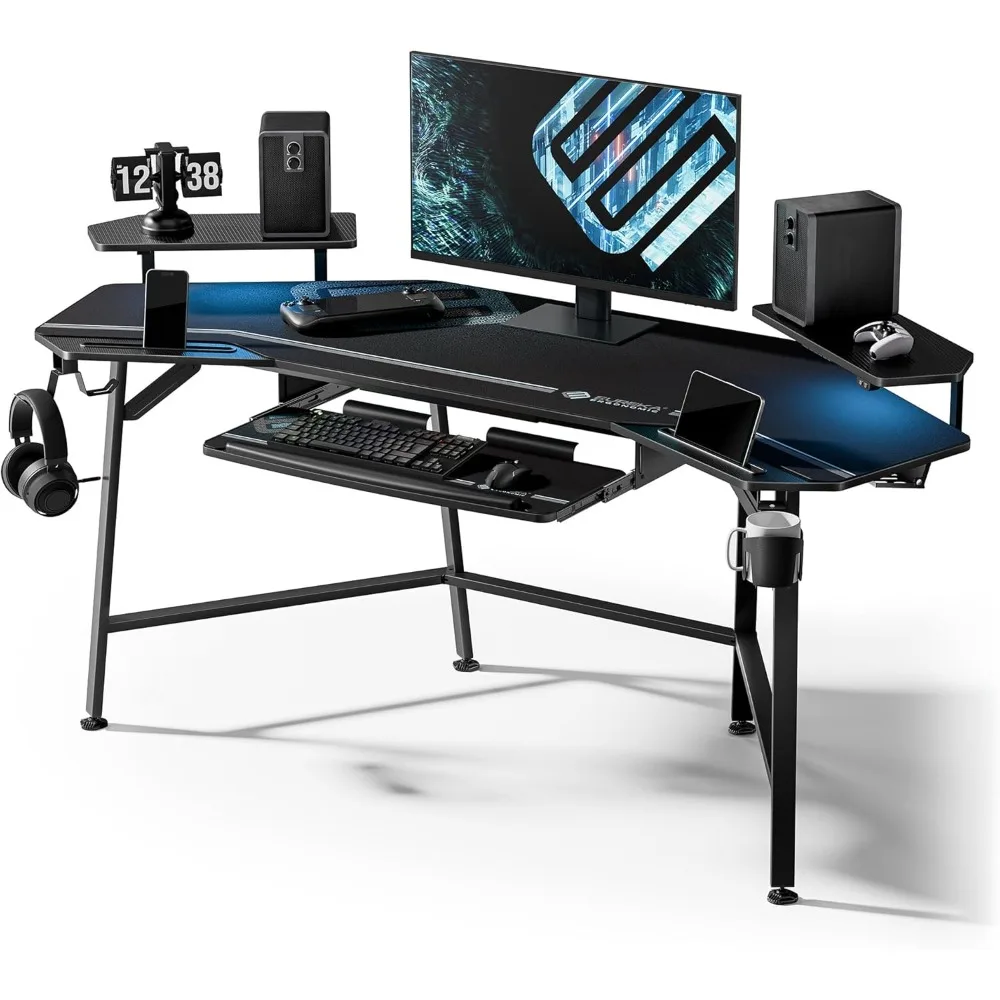
Aero 72 Inch Gaming Desk with Keyboard Tray, Large Computer Desk Led Lights, Wing-Shaped Monitor Stand , Customized
For a well-rounded option that combines a sturdy build with a convenient keyboard tray, consider the Aero 72 Inch Gaming Desk with Keyboard Tray, which also features LED lights and a wing-shaped monitor stand.
Frequently asked questions
What is the ideal height for a gaming desk with keyboard tray?
The ideal height depends on your own height and chair. Generally, your elbows should be at a 90-degree angle when typing, and your feet flat on the floor. Many desks are around 29 inches tall, but adjustable keyboard trays can help achieve the perfect position.
Can I add a keyboard tray to an existing desk?
Yes, you can purchase separate keyboard tray kits that attach under your current desk. However, these may not be as stable or adjustable as integrated trays, so consider your needs before retrofitting.
Are gaming desks with keyboard trays suitable for work?
Absolutely. The ergonomic benefits apply to any task that involves typing or using a mouse. Many people use these desks for both gaming and professional work, as they offer the same comfort and organization.
How much weight can a keyboard tray hold?
It varies by model, but most keyboard trays can hold between 15 to 30 pounds. Be sure to check the specifications if you plan to place heavy items on the tray, though typically it’s just for a keyboard and mouse.
