
Blog
The Ultimate L Shaped Computer Desk Buying Guide
Buying Guide
How to Choose the Perfect L Shaped Computer Desk
An L shaped computer desk can transform your workspace, offering ample surface area and ergonomic benefits. But with so many options, how do you pick the right one?
Why Choose an L Shaped Computer Desk?
An L shaped computer desk is more than just a trendy piece of furniture. It’s a practical solution for maximizing corner space, which is often underutilized in many rooms. Whether you’re a gamer needing room for multiple monitors, a professional juggling paperwork and a computer, or a student with textbooks and a laptop, this configuration offers distinct advantages.
First, it provides a generous work surface that can be divided into zones. You might have a primary area for your computer and a secondary area for writing or other tasks. This separation can help you stay organized and focused. Second, the corner design naturally fits into the corner of a room, freeing up central floor space for other furniture or movement. This is especially valuable in smaller homes or apartments where every square foot counts.
Moreover, many L shaped desks are designed with ergonomics in mind. The corner can be a comfortable spot for your monitor, allowing you to position it at eye level and at the correct distance, reducing strain on your neck and eyes. You can also alternate between different work areas, which encourages movement and can prevent stiffness from sitting in one position for too long.
Finally, these desks come in a variety of styles, from modern glass to rustic wood, so you can find one that matches your décor. They’re not just functional; they can be a stylish centerpiece for your home office or gaming setup.
Key Factors to Consider When Buying
Before you make a purchase, take a moment to evaluate your needs and your space. Here are the critical factors to keep in mind:
- Space and Dimensions: Measure your room and the specific corner where you plan to place the desk. Remember to account for the depth of both sides and the height. You don’t want a desk that overwhelms the room or blocks doorways. Also, consider the footprint: some desks have a larger footprint than others, even if they offer similar surface area.
- Material and Durability: Desks are commonly made from particle board, MDF, solid wood, or metal. Solid wood is durable and attractive but can be heavy and expensive. MDF and particle board are more affordable but may be less resistant to moisture and scratches. Metal frames offer stability and a modern look. Think about how much wear and tear your desk will endure and choose accordingly.
- Ergonomics and Comfort: The desk height should allow you to sit with your feet flat on the floor and your arms at a 90-degree angle when typing. If you’re taller or shorter than average, look for a desk with adjustable legs or consider a sit-stand model. Also, check the depth of the desk to ensure you have enough space for your monitor and keyboard without straining.
- Storage and Organization: Do you need drawers, shelves, or cable management? Think about what you’ll be storing: files, stationery, gaming accessories, or simply a cup of coffee. Some desks come with built-in drawers and shelves, while others are more minimalist. You can always add external storage later, but integrated solutions often look cleaner.
- Style and Aesthetics: Your desk will be a prominent piece in your room, so choose a style that complements your existing furniture and reflects your personality. From sleek and modern to warm and rustic, the options are endless. Consider the color, finish, and overall design language.
- Assembly and Maintenance: Some desks require complex assembly with many parts. If you’re not handy, look for desks with simple assembly instructions or pre-assembled options. Also, consider how easy it is to clean the surface. A matte finish might show fingerprints more than a textured one.
Size and Dimensions: Finding the Right Fit
One of the most common mistakes when buying an L shaped computer desk is underestimating the space it requires. You need to measure not only the floor area but also the clearance for chairs and movement. Here’s a breakdown:
Standard Sizes
L shaped desks typically have two wings of equal or different lengths. Common sizes are 60 inches by 60 inches, 72 inches by 72 inches, and even larger. The depth (front to back) usually ranges from 20 to 30 inches. The height is typically around 29 to 30 inches, which is standard for most adults.
Measuring Your Space
First, measure the length of both walls that form the corner. Subtract at least 6 inches from each to allow for baseboards and clearance. Then, measure the diagonal distance from the corner to the opposite point where you’ll place the desk. This will give you an idea of how much floor space the desk will occupy. Also, consider the space behind the desk for a chair – you’ll need at least 3 feet of clearance for comfortable movement.
Consider Your Equipment
If you have a large monitor, multiple monitors, or a tower PC, you’ll need a deeper desk. For gaming, you might want a wider surface to accommodate a keyboard, mouse, and possibly a joystick. For general office work, a shallower desk might suffice. Make a list of everything you plan to place on the desk and measure the total footprint.
Adjustable Options
Some L shaped desks come with adjustable heights, which can be a great investment if you plan to alternate between sitting and standing. These are often more expensive but offer ergonomic benefits that can improve your comfort and productivity.
Materials and Durability: What’s Best for You?
The material of your desk affects not only its appearance but also its longevity, weight, and price. Here’s a closer look at the most common materials:
Wood and Wood Veneers
Solid wood desks are the most durable and can last for decades if properly cared for. They have a timeless appeal and can be refinished if scratched. However, they are heavy and often more expensive. Wood veneer desks have a thin layer of real wood over a cheaper core, offering a similar look at a lower cost but with less durability.
MDF and Particle Board
These are engineered wood products made from wood fibers and resin. They are affordable and come in a variety of finishes, including laminate that mimics wood grain. They are lighter than solid wood but can be susceptible to moisture damage and chipping. With proper care, they can last for years, making them a popular choice for budget-conscious buyers.
Metal
Metal desks, often with a steel frame and a glass or wood top, are sturdy and have a modern, industrial look. They are resistant to scratches and moisture, but they can be cold and noisy. Some metal desks are adjustable in height, which is a plus.
Glass
Glass desks are sleek and can make a small room feel larger because they don’t visually block the floor. However, they show fingerprints and smudges easily and can be fragile. Tempered glass is safer and stronger, but it can still crack under heavy impact.
When choosing a material, consider your lifestyle. If you have kids or pets, a scratch-resistant surface might be a priority. If you’re on a tight budget, MDF is a practical choice. If you want a piece that will last a lifetime and you’re willing to invest, solid wood is the way to go.
Ergonomics and Comfort: Work Without Pain
Ergonomics is about designing your workspace to fit your body, not the other way around. An L shaped computer desk can be ergonomically excellent if you set it up correctly. Here are some tips:
Desk Height
The ideal desk height depends on your height and the type of work you do. For typing, your elbows should be at a 90-degree angle, and your forearms should be parallel to the floor. Your feet should rest flat on the floor, with your knees at a 90-degree angle. If the desk is too high, you’ll hunch your shoulders; if it’s too low, you’ll lean forward. Many desks are 29-30 inches high, which suits average-height individuals (5’8″ to 5’10”). If you’re shorter or taller, look for a desk with adjustable legs or use a footrest or a higher chair.
Monitor Placement
Your monitor should be at arm’s length and the top of the screen at or slightly below eye level. This prevents neck strain. The corner of an L shaped desk is often ideal because it allows you to place the monitor directly in front of you, with the keyboard and mouse in a comfortable position.
Organize for Efficiency
Keep frequently used items within easy reach. Place your keyboard and mouse on the main surface directly in front of you. Use one wing for secondary tasks like writing or a second monitor. This reduces twisting and reaching, which can cause back and shoulder pain over time.
Take Breaks
Even with a perfect setup, sitting for hours is harmful. Stand up, stretch, and walk around every hour. Consider a sit-stand desk if you have the budget, but even a regular desk can be used with a balance board or a footrest to encourage movement.
Storage and Organization: Keep Your Workspace Tidy
Clutter can hinder productivity and create stress. An L shaped desk offers ample space for storage, but you need to think about what you need to store. Many models come with drawers, shelves, and cable management features. Here are some options:
Built-in Drawers
Drawers are perfect for storing documents, stationery, and small items. They can be full-extension for easy access or lockable for privacy. Some desks have a large file drawer that can accommodate hanging folders. If you have a lot of paperwork, a drawer with a file rail is a must.
Shelves and Hutches
Some L shaped desks include a hutch or upper shelves for books, speakers, or decorative items. This can free up desk space but might make the desk feel more imposing. Consider whether you prefer an open or closed design.
Cable Management
With computers, monitors, printers, and chargers, cables can quickly become a mess. Look for desks with built-in cable trays, grommet holes, or clips that keep wires organized and out of sight. This not only looks better but also prevents accidents and makes cleaning easier.
Additional Storage
If your desk doesn’t have enough storage, you can add a filing cabinet, a bookshelf, or a small storage cart nearby. This gives you flexibility to adjust as your needs change.
Style and Aesthetics: Match Your Room
Your desk is a major piece of furniture, so it should reflect your personal style and blend with your room’s décor. Here are some popular styles:
Modern and Minimalist
Clean lines, sleek surfaces, and neutral colors like white, black, or gray. These desks often have a metal frame and a glass or wood top. They look great in contemporary spaces and don’t overwhelm the eye.
Rustic and Industrial
Reclaimed wood, visible metal bolts, and a rugged finish. These desks add warmth and character, perfect for a loft or a home office with a vintage vibe.
Traditional and Classic
Rich wood tones, ornate details, and a polished finish. These desks often have more storage and a timeless appeal that fits traditional homes.
Gaming and Futuristic
Bold shapes, RGB lighting, and carbon fiber textures. These desks are designed for gamers and often feature cable management and headphone hooks. They can be a statement piece in any room.
When choosing a style, think about the overall look of your room. Do you want the desk to blend in or stand out? Consider the color scheme and materials you already have. A desk that clashes with your room can be distracting, while one that harmonizes can make the space feel cohesive.
Budget and Value: Getting the Most for Your Money
L shaped computer desks range from under $100 to over $1,000. The price depends on material, brand, features, and build quality. Here’s how to make a smart investment:
Set a Budget
Decide how much you’re willing to spend before you start shopping. Remember that a desk is a long-term purchase, so it’s worth investing in quality if you can. But you don’t have to break the bank; there are good options at every price point.
Prioritize Features
Make a list of must-have features and nice-to-have features. For example, you might need a desk with drawers, but LED lighting might be a bonus. Focus on the essentials and be willing to compromise on extras if they push the price too high.
Check Reviews
Read customer reviews to get an idea of the desk’s real-world durability and ease of assembly. Look for common complaints, such as wobbly legs, difficult assembly, or poor packaging. A desk with mostly positive reviews is likely a safe bet.
Consider Long-Term Costs
A cheap desk might save money now, but if it falls apart in a year, you’ll have to replace it. Invest in a desk that will last, even if it costs a bit more upfront. Also, consider the cost of accessories like a monitor stand, chair, or cable organizers.
Ultimately, the best L shaped computer desk is one that fits your space, meets your needs, and makes you happy every time you sit down to work. Take your time, do your research, and you’ll find the perfect one.
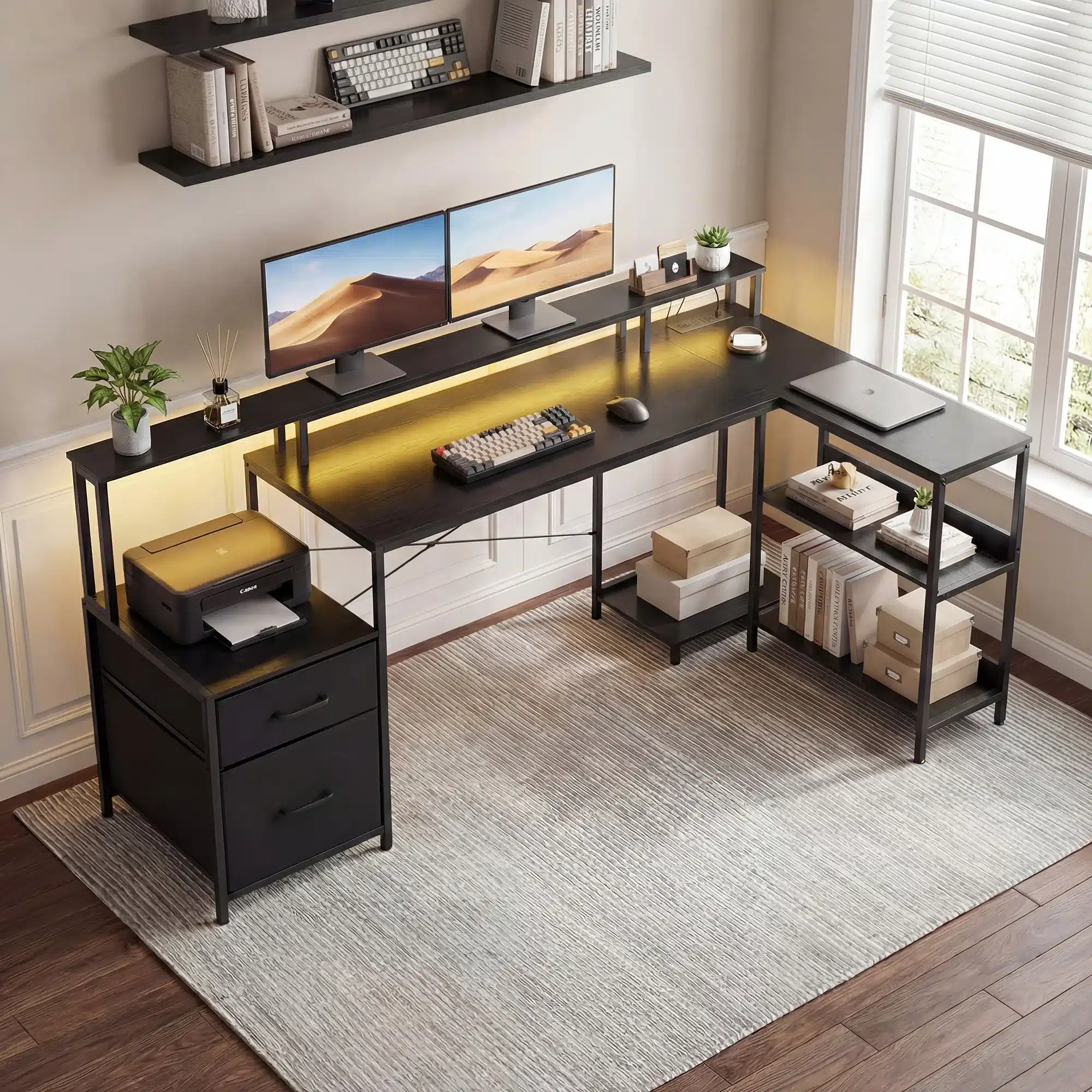
JHK 75IN L-Shaped Computer Desk with Power Outlet and LED Strip 2 Drawers For Study Office Gaming Wood Table Modern Work Table
If you’re looking for a feature-rich option, the JHK 75IN L-Shaped Computer Desk with Power Outlet and LED Strip and 2 Drawers offers convenience and style for both work and play.
Frequently asked questions
What are the standard dimensions of an L shaped computer desk?
Standard L shaped desks typically have two wings of equal or different lengths, ranging from 60 to 72 inches, with a depth of 20-30 inches and a height of around 29-30 inches. Always measure your space to ensure a proper fit.
Can an L shaped desk fit in a small room?
Yes, L shaped desks are designed to utilize corner space efficiently. However, you need to measure your room and choose a desk with appropriate dimensions. Some models are more compact, so look for smaller footprints if space is tight.
What materials are best for an L shaped computer desk?
The best material depends on your budget and needs. Solid wood is durable and attractive but heavy and expensive. MDF and particle board are affordable and lightweight but less resistant to moisture. Metal frames offer stability and a modern look, while glass tops are sleek but fragile.
How can I make my L shaped desk more ergonomic?
Ensure the desk height allows your elbows at a 90-degree angle and feet flat on the floor. Place your monitor at arm’s length and top of screen at eye level. Use the corner for your primary work area, and take regular breaks to stretch.
