Follow us on Instagram @goldomallc
Free shipping on orders over $53 USD
Handcrafted with love
New home décor collection available now
Use code GOLDOMA15 for 15 % off
Follow us on Instagram @goldomallc
Free shipping on orders over $53 USD
Handcrafted with love
New home décor collection available now
Use code GOLDOMA15 for 15 % off


Power Recliner with USB: Comfort Meets Convenience
Buying Guide
Find Your Perfect Power Recliner with USB
A power recliner with USB charging is more than just a seat—it’s a command center for relaxation. In this guide, we’ll help you navigate the features that matter most.
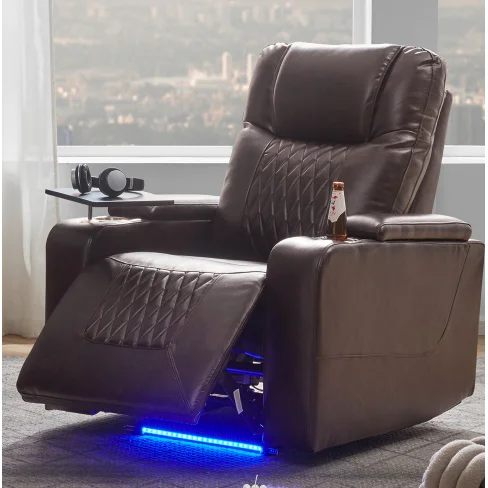
USB Charging Hidden Storage Swivel Tray
Why Choose a Power Recliner with USB?
Modern living demands convenience. A power recliner with USB integration lets you charge your devices without hunting for an outlet. Whether you’re binge-watching or working from home, having a charging port within arm’s reach keeps you powered up and comfortable.
Key Features to Look For
Charging Capabilities
Not all USB ports are equal. Look for models with fast-charging ports (2.1A or higher) to juice up tablets and phones quickly. Some recliners even include multiple ports for simultaneous charging.
Reclining Mechanism
Power recliners offer smooth, infinite positioning at the touch of a button. Test the range—from upright to fully reclined—to ensure it suits your relaxation style.
Storage Solutions
Hidden compartments are a game-changer. Store remote controls, books, or snacks out of sight. A built-in storage ottoman or side pocket adds extra utility.
Swivel Tray Table
A swivel tray provides a stable surface for laptops or meals. Make sure it locks securely and doesn’t wobble during use.
Materials and Durability
Leather, fabric, or bonded leather? Each has pros. Faux leather is easy to clean but can peel over time. Fabric offers breathability but may stain. Look for high-density foam cushions and sturdy metal mechanisms for longevity. Learn more about leather types on Wikipedia.
Size and Space Considerations
Measure your room and doorways. Power recliners require clearance for full recline—usually 6–12 inches from the wall. Consider a wall-hugger design if space is tight.
Additional Comfort Elements
- Lumbar support: Adjustable or built-in support reduces back strain.
- Headrest: A padded headrest enhances neck comfort.
- Heat and massage: Some models add these luxury features for extra relaxation.
How to Maintain Your Recliner
Keep your power recliner with USB ports clean by wiping with a damp cloth and avoiding harsh chemicals. Check the mechanism annually for loose bolts or worn parts. Protect the USB ports from dust with covers when not in use.
Making the Right Choice
Balance your budget with desired features. A quality power recliner with USB charging is an investment in daily comfort. Prioritize reliable construction and warranty coverage.
Worth a look
Goldoma Power Motion Recliner with USB Charging, Hidden Storage, ° Swivel Tray – Brown
For a seamless blend of these features, consider the Goldoma Power Motion Recliner with USB Charging, Hidden Storage, and Swivel Tray—designed to simplify your daily relaxation.
Frequently asked questions
Can I use the USB port while the recliner is moving?
Yes, the USB port remains active even during recline, so you can charge continuously.
How much weight can a power recliner typically support?
Most power recliners support up to 300–350 lbs. Check the manufacturer’s specifications for exact limits.
Do power recliners need to be plugged in all the time?
Yes, they require a constant power source. Some models have battery backup for temporary use during outages.
Can I place a power recliner on carpet?
Yes, but ensure the carpet is low-pile to allow smooth recline. High-pile carpets may impede movement.