
Blog
How to Choose the Perfect TV Stand with Storage
Buying Guide
Find Your Ideal TV Stand with Storage
A TV stand with storage is essential for keeping your entertainment area organized and stylish. Whether you need space for media components, games, or decor, the right unit balances function and form.
Why Choose a TV Stand with Storage?
A TV stand with storage does more than hold your television; it hides cables, stores DVDs, gaming consoles, and remote controls, reducing clutter. According to a study on interior design principles, well-organized spaces promote relaxation. Investing in a unit with dedicated storage helps maintain a tidy living room while keeping essentials within reach.
Key Features to Look For
Size and Weight Capacity
Measure your TV’s width and ensure the stand is at least a few inches wider. Check the weight limit; most stands support 50-100 lbs. Also consider the depth to accommodate soundbars or cable boxes.
Storage Configuration
Look for adjustable shelves, drawers, or cabinets. Open shelves allow easy access to devices, while closed cabinets hide clutter. A mix of both offers flexibility. For example, a sliding cabinet can conceal items yet remain accessible.
Material and Build Quality
Solid wood or engineered wood with a durable finish lasts longer. Metal accents add a modern touch. Avoid particleboard that can sag over time. Check for reinforced corners and sturdy legs.
Style Considerations for Your Living Room
Your TV stand should complement your decor. Mid-century modern designs feature tapered legs and warm wood tones, fitting both retro and contemporary spaces. Industrial styles use metal and dark wood, while minimalist stands focus on clean lines and neutral colors. Choose a finish that matches other furniture.
Space Planning and Placement
Measure your room and mark the TV’s viewing distance (typically 1.5 to 2.5 times the screen size). Leave clearance for ventilation if you place electronics inside. Corner units save space in small rooms, while wide consoles anchor larger walls.
Additional Tips for Organizing Your Media
Use cable management systems to keep wires tidy. Label cords for easy troubleshooting. Store frequently used items like remotes in a drawer or basket. Rotate seasonal decor on open shelves to keep the look fresh.
Balancing Budget and Quality
Set a budget before shopping. Stands range from $100 to $800+. Mid-range options often offer the best value with solid construction and style. Look for sales or floor models. Remember that a well-built TV stand with storage can last for years.
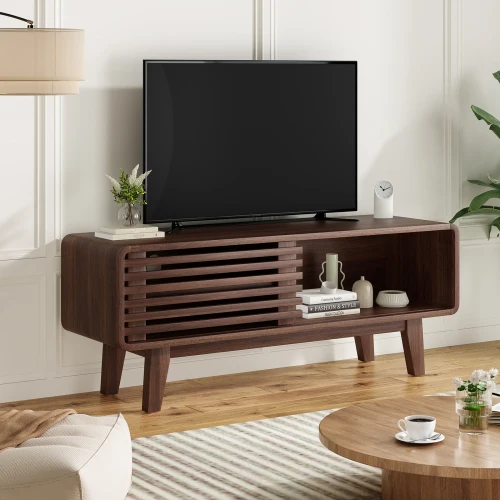
Goldoma Mid-Century TV Stand for TVs up to 59 Inches with Sliding Storage Cabinet
For a blend of style and practicality, consider the Goldoma Mid-Century TV Stand for TVs up to 59 Inches with Sliding Storage Cabinet, which offers ample hidden storage and a timeless design.
Frequently asked questions
What size TV stand with storage do I need for a 55-inch TV?
For a 55-inch TV, choose a stand that is at least 55 inches wide—ideally 60-70 inches—to provide stability and room for accessories. Also check the weight capacity, typically 50-80 lbs.
Can I put a soundbar on a TV stand with storage?
Yes, most stands have enough surface space for a soundbar. Ensure the stand is deep enough (at least 16-18 inches) to accommodate the soundbar without overhang. Some stands even have designated slots for soundbars.
How do I hide cables on a TV stand with storage?
Many stands come with built-in cable management holes or channels. You can also use adhesive cable clips, raceways, or zip ties to route cords along the back. Closed cabinets can hide power strips and excess wiring.
Is a TV stand with storage better than a wall mount?
It depends on your needs. A stand offers storage and furniture style, while a wall mount saves floor space and provides a sleek look. If you have a lot of media components, a stand is more practical. Some people combine both by mounting the TV above a low console.
