
Blog
The Ultimate Computer Desk with Drawers Buying Guide
Buying Guide
Your Guide to Choosing a Computer Desk with Drawers
A computer desk with drawers is more than a workspace; it’s the command center of your daily productivity. We’ll walk you through key considerations to find the perfect fit for your needs.
Why Choose a Computer Desk with Drawers?
When setting up a home office or gaming station, the desk is the centerpiece. A computer desk with drawers offers a dedicated spot for your computer, monitor, and peripherals, while providing essential storage for documents, stationery, and personal items. This combination of workspace and storage helps keep your area tidy and efficient, reducing clutter and improving focus.
Drawers are particularly useful for stashing items you don’t need every day, like cables, external drives, or notebooks. They also keep sensitive documents out of sight, offering a level of security and privacy. Whether you’re working from home or managing a busy household, a desk with drawers can significantly enhance your organization.
Key Factors to Consider When Buying
Before you start shopping, it’s important to think about your specific needs. Here are some crucial factors to evaluate:
- Size and Dimensions: Measure your available space. Consider the desk’s length, depth, and height. Ensure there’s enough legroom and that the desk fits comfortably in your room without overwhelming it.
- Material and Build Quality: Desks come in various materials like solid wood, MDF, metal, or glass. Solid wood is durable but heavier and more expensive. MDF is affordable and smooth, but less resistant to moisture. Metal frames offer stability and a modern look. Choose a material that matches your style and durability expectations.
- Storage Capacity: Evaluate how many drawers you need and their sizes. Some desks offer a mix of shallow and deep drawers for different items. Consider if you need locking drawers for privacy.
- Ergonomics: Your desk should promote good posture. The height should allow your elbows to rest at a 90-degree angle when typing. If the desk is too high or low, it can cause strain. Some desks have adjustable height features.
- Style and Aesthetics: The desk will be a prominent piece of furniture. Choose a design that complements your room’s decor. From minimalist to rustic, there are countless styles to match your taste.
Size and Space Planning
One of the most common mistakes is buying a desk that’s too big or too small. To avoid this, measure your room and plan the layout. A good rule of thumb is to leave at least 24 inches of walking space around the desk. Also, consider the depth: you need enough room for your monitor and keyboard, typically at least 24 inches. For multiple monitors or a lot of paperwork, a deeper desk is better.
If you have a small space, look for a compact desk with drawers that doesn’t sacrifice functionality. Some desks have a vertical design with drawers stacked underneath, saving floor space. For larger rooms, a sprawling desk can provide ample workspace and storage.
Materials: Pros and Cons
The material of your desk affects its look, durability, and price. Here’s a breakdown of common options:
Wood
Wood desks are classic and sturdy. They can be made from solid hardwoods like oak or walnut, which are extremely durable and can last for decades. However, they are heavy and require maintenance. Alternatively, engineered wood like MDF or particleboard is less expensive and lighter, but may not withstand heavy use.
Metal
Metal desks are often used in industrial or modern settings. They are robust and easy to clean. A metal frame with a wood or glass top combines durability with style. Metal desks can be prone to scratches and dents, but many have a powder-coated finish that resists wear.
Glass
Glass desks look sleek and make a room feel larger. They are easy to wipe clean but can show fingerprints and smudges. Tempered glass is strong, but it can still crack under extreme impact. Glass desks often lack drawers, so if you need storage, look for a design that incorporates them.
Drawer Design and Functionality
Not all drawers are created equal. When evaluating a computer desk with drawers, pay attention to the following:
- Sliding Mechanism: Look for drawers with ball-bearing slides for smooth, quiet operation. They should glide open and close effortlessly.
- Drawer Size: Consider what you plan to store. Shallow drawers are great for pens and small items, while deeper drawers can hold files or a keyboard.
- Weight Capacity: Each drawer has a maximum load. If you plan to store heavy items, ensure the drawer can handle it.
- Locking Mechanism: Some desks have drawers that lock, providing security for sensitive items. This is a nice feature for home offices.
Ergonomics and Comfort
Your desk should not only fit your space but also your body. An ergonomic setup reduces the risk of back, neck, and wrist pain. Here are some tips:
- Desk Height: When seated, your feet should rest flat on the floor, and your thighs should be parallel to the ground. The desk surface should be at elbow height, allowing your arms to rest comfortably.
- Monitor Placement: The top of your monitor should be at or slightly below eye level, about an arm’s length away. This reduces eye strain and promotes good posture.
- Keyboard and Mouse: Keep them at a height that allows your wrists to be straight. Consider a keyboard tray if your desk is too high.
- Lighting: Ensure the desk is well-lit to reduce eye fatigue. Natural light is best, but a good desk lamp can help.
Some desks come with adjustable features, such as height-adjustable legs or a monitor stand. These can be beneficial if you share your desk with others or have specific needs.
Style and Aesthetics
Your desk should reflect your personal style and complement your existing decor. Whether you prefer a modern, minimalist look or a classic, traditional design, there’s a desk for you. Consider the color, finish, and overall silhouette. A dark wood desk can add warmth, while a white desk can make a room feel airy. Metal and glass desks offer a contemporary vibe. Don’t forget about the chair – it should match the desk’s style and provide comfort.
If you’re into gaming, you might want a desk with a gamer aesthetic, such as RGB lighting or a carbon fiber texture. For a professional home office, a sleek, understated design may be more appropriate.
Additional Features to Look For
Modern computer desks often come with extra features that enhance functionality. Here are some to consider:
- Built-in Power Outlets: Desks with power strips or USB ports make it easy to charge your devices without reaching for an outlet.
- Cable Management: Look for desks with cable trays or grommets to keep wires organized and out of sight.
- LED Lighting: Some desks have LED strips that add ambiance and can be customized. This is popular for gaming setups.
- Keyboard Tray: A pull-out tray for your keyboard can save surface space and improve ergonomics.
- Shelving: Some desks have shelves above or below for additional storage.
These features can make your desk more versatile and enjoyable to use. Assess which ones are important to you.
Budget and Value
Computer desks range from budget-friendly to high-end. It’s important to set a budget before you start shopping. Remember that a desk is an investment – a good quality desk can last for years, so it’s worth spending a bit more for durability and functionality. However, you don’t have to break the bank. There are many affordable options that offer great value.
When comparing prices, consider the materials, build quality, and features. A desk that’s slightly more expensive but has better construction and more storage may be a better deal in the long run. Also, factor in shipping costs and any assembly required.
Our Recommendation
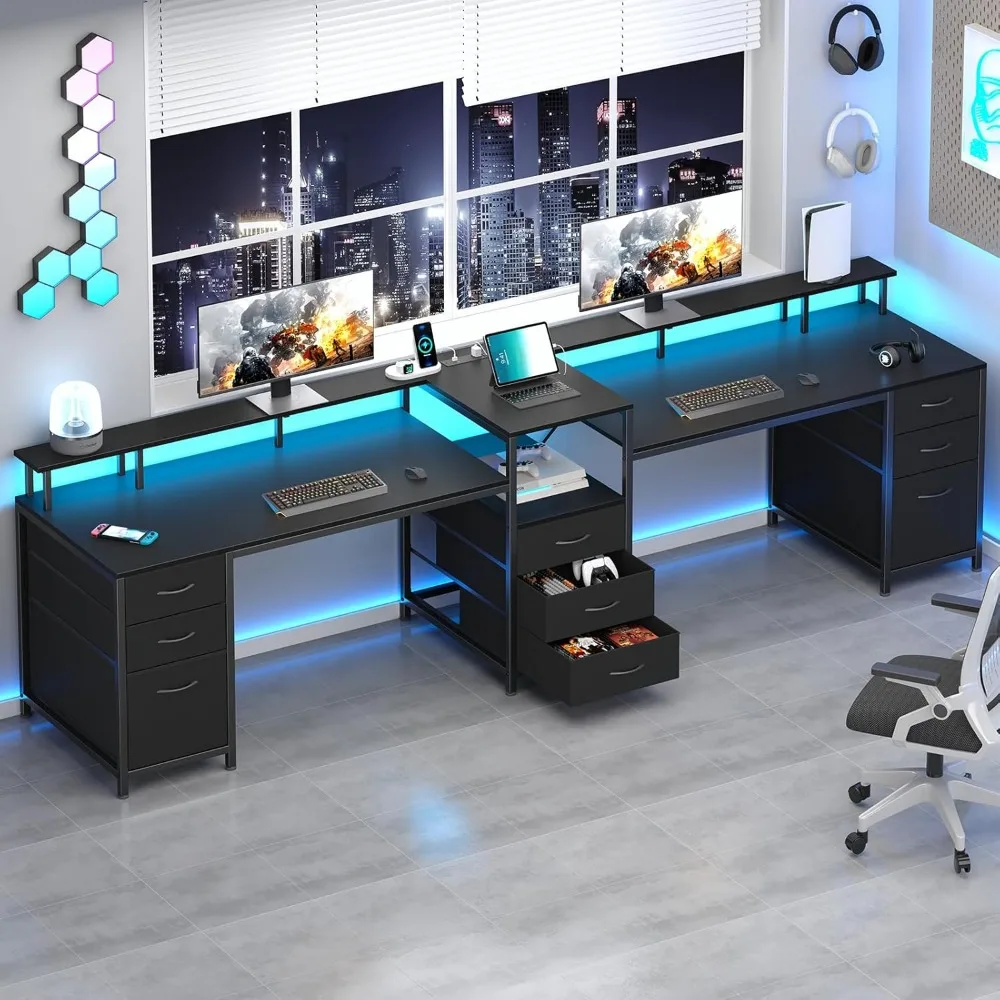
After considering all these factors, you might be ready to make a choice. If you’re looking for a versatile, spacious desk that accommodates two people and offers ample storage, the Premium 98.4 Long Computer Desk with 9 Drawers is an excellent option. It combines functionality with style, making it a great addition to any home office or gaming room.
Premium 98.4 Long Computer Desk with 9 Drawers, 2 Person Gaming Desk with LED Lights & Power Outlet, Two Person Home Office Desk
For a spacious, well-organized workspace that fits two people, consider the Premium 98.4 Long Computer Desk with 9 Drawers, which offers ample storage and built-in convenience.
Frequently asked questions
What is the ideal size for a computer desk with drawers?
The ideal size depends on your space and needs. Measure your room and ensure at least 24 inches of walking space around the desk. For a single monitor setup, a desk of 48-60 inches wide is often sufficient. For multiple monitors or a two-person setup, consider a wider desk, like 72 inches or more. Depth should be at least 24 inches, but 30 inches is more comfortable for larger monitors.
How many drawers do I need on a computer desk?
Think about what you’ll store. If you have many small items like pens, sticky notes, and cables, several small drawers may be useful. If you need to store files or a keyboard, a deep drawer is helpful. A mix of drawer sizes often works best. Also, consider if you want a locking drawer for privacy.
What material is best for a computer desk with drawers?
Solid wood is the most durable and aesthetically pleasing, but it’s heavy and can be expensive. MDF or particleboard is more budget-friendly but less durable. Metal desks are sturdy and have a modern look, but they can be prone to scratches. Choose based on your budget, style, and how much wear and tear the desk will endure.
Are LED lights on a computer desk worth it?
LED lights can enhance the ambiance of your workspace and are popular for gaming setups. They can reduce eye strain in low-light conditions and add a personal touch. However, they are not essential for functionality. If you enjoy customizable lighting, a desk with LED features can be a nice addition.
