
Blog
The Complete Guide to Choosing a Standing Desk with Drawer
Buying Guide
Your Ultimate Standing Desk with Drawer Companion
A standing desk with drawer can transform your workspace, blending ergonomic flexibility with convenient storage. In this guide, we’ll help you navigate the key features to consider, ensuring you make an informed choice that fits your needs and style.
Why Choose a Standing Desk with Drawer?
Standing desks have surged in popularity as more people seek to break free from prolonged sitting. Adding a drawer to the equation solves a common dilemma: where to store your essentials without cluttering your work surface. A standing desk with drawer offers the perfect blend of health benefits and practicality, keeping your pens, notebooks, and gadgets within arm’s reach while you alternate between sitting and standing.
Beyond the obvious convenience, a drawer can help you maintain a tidy workspace, which is linked to increased focus and productivity. Imagine having a dedicated spot for your chargers, sticky notes, and other desk accessories—no more digging through piles. This guide will walk you through everything you need to consider, from ergonomics to materials, so you can find the standing desk with drawer that feels like it was made for you.
Ergonomics: The Foundation of Comfort
When investing in a standing desk, ergonomics should be your top priority. The primary goal is to reduce the strain on your neck, shoulders, and wrists, whether you’re sitting or standing. A good desk should allow you to adjust the height easily, so you can align your monitor at eye level and keep your elbows at a 90-degree angle.
Height Range and Adjustability
Look for a desk with a wide height range that accommodates both sitting and standing positions. Most people find a range between 24 and 50 inches sufficient. Consider how the adjustment mechanism works: electric lifts are smooth and convenient, while manual crank mechanisms are more budget-friendly but may require more effort. Also, check the number of presets if you want to switch between your favorite heights with the touch of a button.
Monitor and Keyboard Placement
Your desk should be deep enough to allow proper monitor placement—at least 20 inches from your eyes. A standing desk with drawer often has a shallow drawer, which might reduce the effective depth, so measure carefully. Pair your desk with an adjustable monitor arm and a keyboard tray to fine-tune your setup for maximum comfort.
Material and Build Quality: Durability Meets Style
The materials used in your desk determine not only its appearance but also its longevity. You’ll encounter a variety of options, each with its own pros and cons.
- Solid Wood: Offers a classic, warm look and exceptional durability. It’s heavier and more expensive but can last a lifetime if cared for properly.
- Engineered Wood (MDF or Particleboard): More affordable and available in many finishes, but less resistant to moisture and scratches. Look for high-density MDF with a protective laminate.
- Metal: Often used for frames, providing stability and a modern industrial aesthetic. Steel frames are the most robust.
Frame Stability
Test the desk’s stability by giving it a gentle shake at standing height. A wobbling desk is distracting and can affect your work. Look for a frame with a crossbar or a wide footprint. The weight capacity is also crucial—ensure it can hold your monitors, laptop, and other equipment without strain.
Drawer Design: Functionality and Aesthetics
The drawer is the defining feature of this desk type, so its design matters. Consider the size, location, and how it integrates with the desk’s overall look.
Size and Storage Capacity
Think about what you’ll store: small items like pens and sticky notes, or larger accessories like a keyboard? A shallow drawer is fine for office supplies, but if you need to store a tablet or documents, look for a deeper option. Some desks offer multiple drawers or a combination of open and closed storage.
Drawer Slides and Smooth Operation
Quality drawer slides are essential for smooth, quiet opening and closing. Look for ball-bearing slides that can withstand frequent use. Soft-close mechanisms are a premium touch that prevents slamming and adds a feel of luxury.
Cable Management: Keep Your Workspace Tidy
In our tech-driven world, cable clutter is a major eyesore. A good standing desk with drawer should offer integrated cable management solutions to keep cords organized and out of sight.
Look for features like cable trays, grommets, or built-in channels that route wires from your devices to a power strip. Some desks even incorporate wireless charging pads, which can eliminate the need for extra cables altogether. When evaluating cable management, think about how many devices you typically have and plan for a little extra capacity to accommodate future additions.
Additional Features: Charging and More
Modern standing desks come with a range of features that enhance convenience and functionality.
- Wireless Charging: A built-in wireless charging pad in the desktop or drawer is a game-changer—just place your phone on the designated spot and it powers up.
- USB Ports: Integrated USB-A and USB-C ports make it easy to charge devices without hunting for an adapter.
- Anti-Collision Technology: When lowering the desk, this feature detects obstacles and stops automatically, preventing damage to your equipment.
These extras can significantly improve your daily experience, but remember that they also add to the cost. Prioritize features that you’ll actually use regularly.
Space and Size Considerations
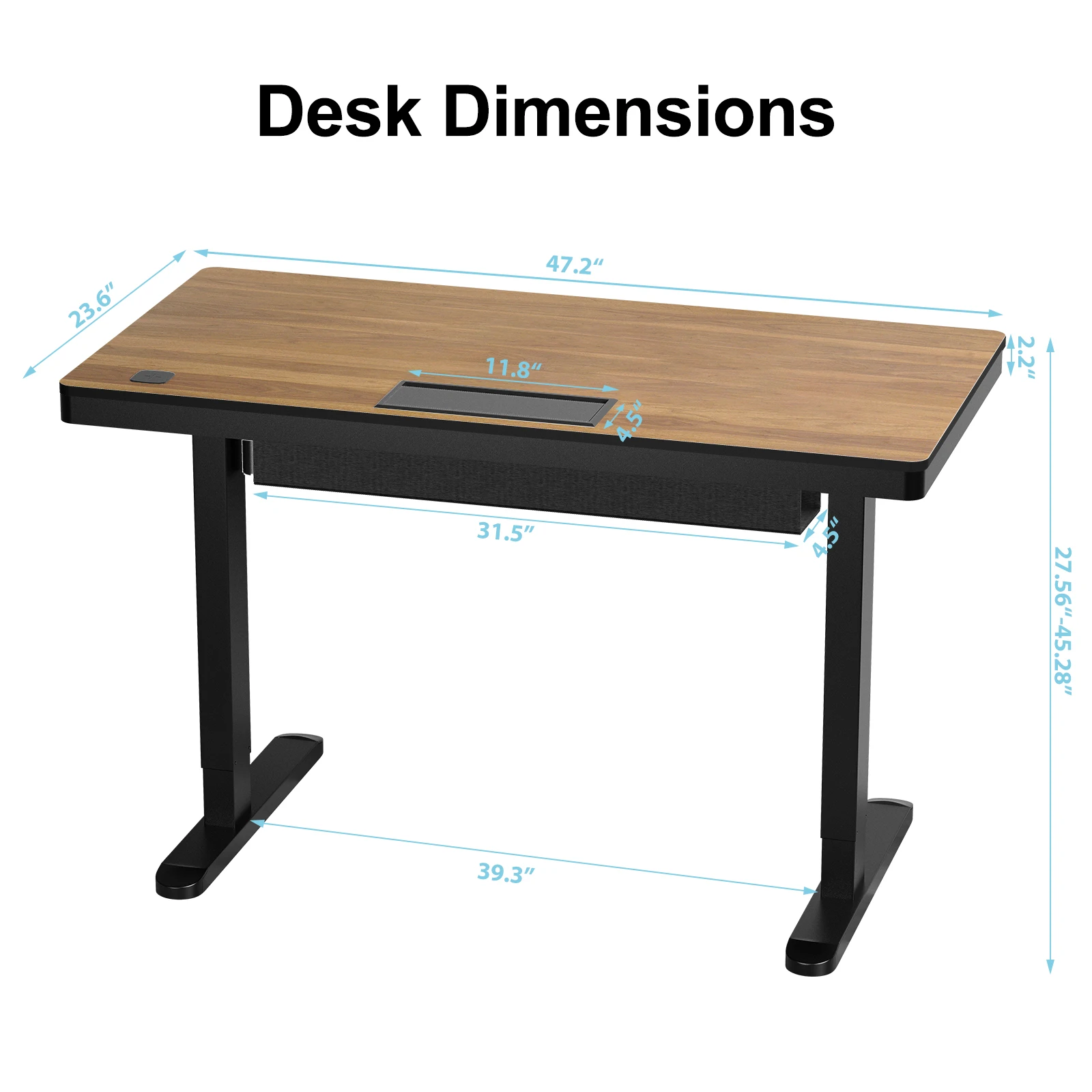
Before purchasing, measure your available space. A standing desk with drawer typically requires more depth than a standard desk due to the drawer. Also, consider the width—do you need a compact 40-inch desk for a small home office, or a spacious 60-inch model for a dual-monitor setup?
Think about the room’s layout: will the desk be against a wall, or do you need access from both sides? If you’re short on space, look for a desk with a slim drawer profile. Additionally, consider the weight of the desk itself—if you move frequently, a lighter model might be more practical.
Budget and Value: Getting What You Pay For
Standing desks with drawers vary widely in price, from budget-friendly options under $300 to premium models exceeding $1,000. As with most furniture, you get what you pay for—higher prices usually mean better materials, smoother mechanisms, and additional features.
Set a budget that reflects how often you’ll use the desk and its importance to your health and productivity. Remember that a standing desk is an investment in your well-being. Don’t skimp on the frame and motor, as these are the components most likely to fail. However, you can save on aesthetic upgrades like premium wood finishes if you’re on a tight budget.
For a reliable and feature-packed option, consider the standing desk models that offer a balance of quality and affordability. When you’re ready to purchase, our Ready to Ship Standing Desk with Drawer Wireless Charging Cable Management, Height Adjustable Desk in USA Warehouse is a great choice that combines many of the features discussed here.
Ready to Ship Standing Desk with Drawer Wireless Charging Cable Management, Height Adjustable Desk in USA Warehouse
For a ready-to-ship solution that integrates a drawer, wireless charging, and cable management, consider our Ready to Ship Standing Desk with Drawer Wireless Charging Cable Management, Height Adjustable Desk in USA Warehouse.
Frequently asked questions
What is the ideal height range for a standing desk with a drawer?
The ideal height range depends on your height. Generally, a range of 24 to 50 inches accommodates most users. For sitting, your elbows should be at a 90-degree angle when typing, and for standing, the desk should be at elbow height as well. Many desks have a programmable controller to save your preferred heights.
Can I add a drawer to my existing standing desk?
Yes, you can purchase standalone drawer units that can be mounted under your existing desk. However, they may not be as integrated or visually seamless as a desk designed with a built-in drawer. If you’re buying a new desk, opting for one with a drawer from the start is often more convenient and stable.
How much weight can a standing desk with drawer typically hold?
Weight capacity varies by model, but most standing desks can hold between 150 and 300 pounds. The drawer itself usually has a lower weight limit (e.g., 10-20 pounds). Always check the specifications to ensure your equipment is within the limits.
Are standing desks with drawers more expensive than regular standing desks?
Yes, the addition of a drawer typically increases the cost, as it requires more materials and manufacturing complexity. However, the price difference can be modest if the drawer is a simple design. You can find affordable options by focusing on essential features and forgoing premium upgrades.
